Clipcanvas is a HD footage and animation marketplace based in Norway founded in 2007. The website site with a black and gold design is fairly quick to load. A large window , on the right hand side of the screen displays continously three different footage every week. Video clips previews use the flash based Flowplayer technology with success: preview window is large (420 by 238 pixels) and the image is crisp and clear making it the best previews I have seen so far on any footage agencies.
How to submit?You can either run the Clipcanvas uploader application from your desktop or normal ftp software like
Filezilla.
The Clipcanvas uploader is pretty straightforward to use: Once logged with your credentials, you just have drag and drop your clips onto a window and click the upload button.
Once submitted, your clip will be placed in the ''tag your clips'' section of the site.The last step is to enter keywords (separated by commas) and minimal informations about the clip such as category,dynamic,handling,camera framing.
Based on my experience, once you have your keywords ready, the final submission does not take more than 30 seconds and if you have a group of similar clips, less than 10 seconds using the available fast tagging. Clipcanvas is by far the easiest and fastest site for your final submission. In addition, clip reviews are very fast, mostly done under 24 hours. I found out that if the Clipcanvas uploader was very slow, uploading using ftp was considerably faster so I will recommend the latter.
Video clips requirementsClipcanvas accepts clips with a minimum duration of 2 seconds and a maximum size of 750MB in the following formats:DV,DVcam,DVCpro 25/50/100,HDV1,HDV2,Xdcam,Xdcam HD,ProResHQ 10bit,ProRes 8bit, AVC intra (must be delivered in ProResHQ),Cineform, 12bit (must be delivered in ProResHQ),Dnx, DnxHD,Photo.jpg/.mjp 75/100%, Digibeta (export to ProRes or photo.jpg before upload).
I did not have so far any rejections by uploading quicktime movies (motionjpeg 95%) rendering from avchd files.
Interview with Cato Cater, CEO of ClipcanvasQ: Can you present briefly the business in which Clipcanvas operates?A: ''We are in a competitive industry comprised of so many professionals with high standards, and it is important to us to do our best to meet the requirements and demands that this implies. This goes for our submitters as well as for our buyers. We deliver video footage to our customers in more than 7 different professional codecs and a total of 20 variations thereof, bringing flexibility to our buyers´ digital workflows. Our primary focus is HD. The main bulk of our customers are working in production and post-production houses, and this list is growing by the day, representing companies and buyers from all over the world''.
Q: What can you tell us about your upcoming developments at Clipcanvas?A: ''With regards to developments in the future, I would like to say we continuously work on making improvements:
- the referral program is in place and will be available from early January - referrers will earn a flat 10% of sales generated by these referrals for a set period of time for each buying user referred
- we will also offer more advanced affiliate solutions for those that want to integrate more closely with Clipcanvas through an API (will also be available in January). For example, the API would make it possible for any of our submitters to display and offer their own clips for sale through their own webpages (if they have one), but it would require some programming skills (with which we might even help out with in certain cases).
- also we are continuously working to improve the service we offer, based on input from all our users, and some of these improvements take more time while others take less, some you notice and some you don´t. We still have a lot of work to do, we are working hard, and I hope our users appreciate this even if some developments take longer time for us to implement than we would wish for''.
''We market our service and the video content offered through Clipcanvas in many different ways, both online and in more traditional media and communication channels. This is something we will intensify in the upcoming year, as we are now at the point where we pack some punch in the market''.
ConclusionIn summary:
Plus for contributors: Euros zone, video previews, referral program (to start in January 2010), ftp, quick final submission, quick reviews, high commission rate (60%), option to set your own prices (from 50 to 500 euros).
Plus for buyers: billing accounts, live support,free H.264 watermarked previews for testing.
Minuses for contributors: did not find any... but feel free to leave a comment if you find some!
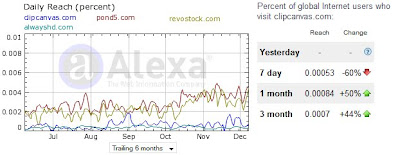
Overall, I found Clipcanvas to be a great marketplace to join and I am looking forward to their new developments in 2010. The number of clips doubled in the last 6 months and Clipcanvas has now a library of just over 50,000 clips. For future reference, Clipcanvas is ranked 157,235 in Alexa.com and below is a 6 months trailing of Clipcanvas traffic compare to some of its competitors.
With a bit more than 100 clips on line I already had my first sale and looking forward to have more. Clipcanvas referral program is not ready yet but feel free to join by clicking the banner below. You can also follow Clipcanvas on
twitter or join their fan page on
facebook.

Browse my
HD clips at Clipcanvas !